
The best forex trading apps depend on the job you need done, and this list does not rank brokers. It compares the apps a forex trader uses around a broker: to chart, plan, follow the news and place the order. A broker is a separate choice, and you should check that yours is regulated where you live. Below, seven apps are compared on the same checks, so you can find the best app for forex trading for your own routine.
The best forex trading apps at a glance
We compared 7 apps on the same checks. We make AiTradely, so it is on this list.
| App | Charts | Economic calendar | Alerts | Demo | Places trades | Price |
|---|---|---|---|---|---|---|
| AiTradelyPlanning a trade with AI | Key levels drawn on chart | Yes | Push and Telegram | Yes, $10,000 of practice money | Yes, via cTrader or MetaTrader 5 account | Paid plans by country |
| MetaTrader 5One platform across many brokers | Yes | Yes (site) | Yes | Yes | Through a broker | App free to download |
| cTraderActive traders wanting modern charts | Yes | Not stated | Yes | Yes | Through a broker | App free to download |
| TradingViewCharting across many markets | Yes | Yes | Yes | Yes (paper trading) | Through integrated brokers | $0 tier, paid from $12.95/mo billed yearly |
| Investing.comNews, calendar and quotes | Yes | Yes | Yes | Not stated | No | Free to download, Pro from $18.95/mo |
| FXStreetForex news and calendar | Yes | Yes | Yes | Not stated | No | Free to download |
| TradaysA simple calendar | Not stated | Yes | Not stated | Not stated | No | At no cost |
Everything about the other apps comes from their own websites and store pages, checked on 5 November 2026. Prices and features change, so check the app before you pay.
How we compared them
Every app got the same questions:
- Can you chart a pair and mark levels on it?
- Is there an economic calendar, so you know when news can move price?
- Can it alert you when price or a rule is hit?
- Is there a demo or practice mode for a beginner?
- Can it place the order, and through what?
1. AiTradely: AI analysis and trade plans
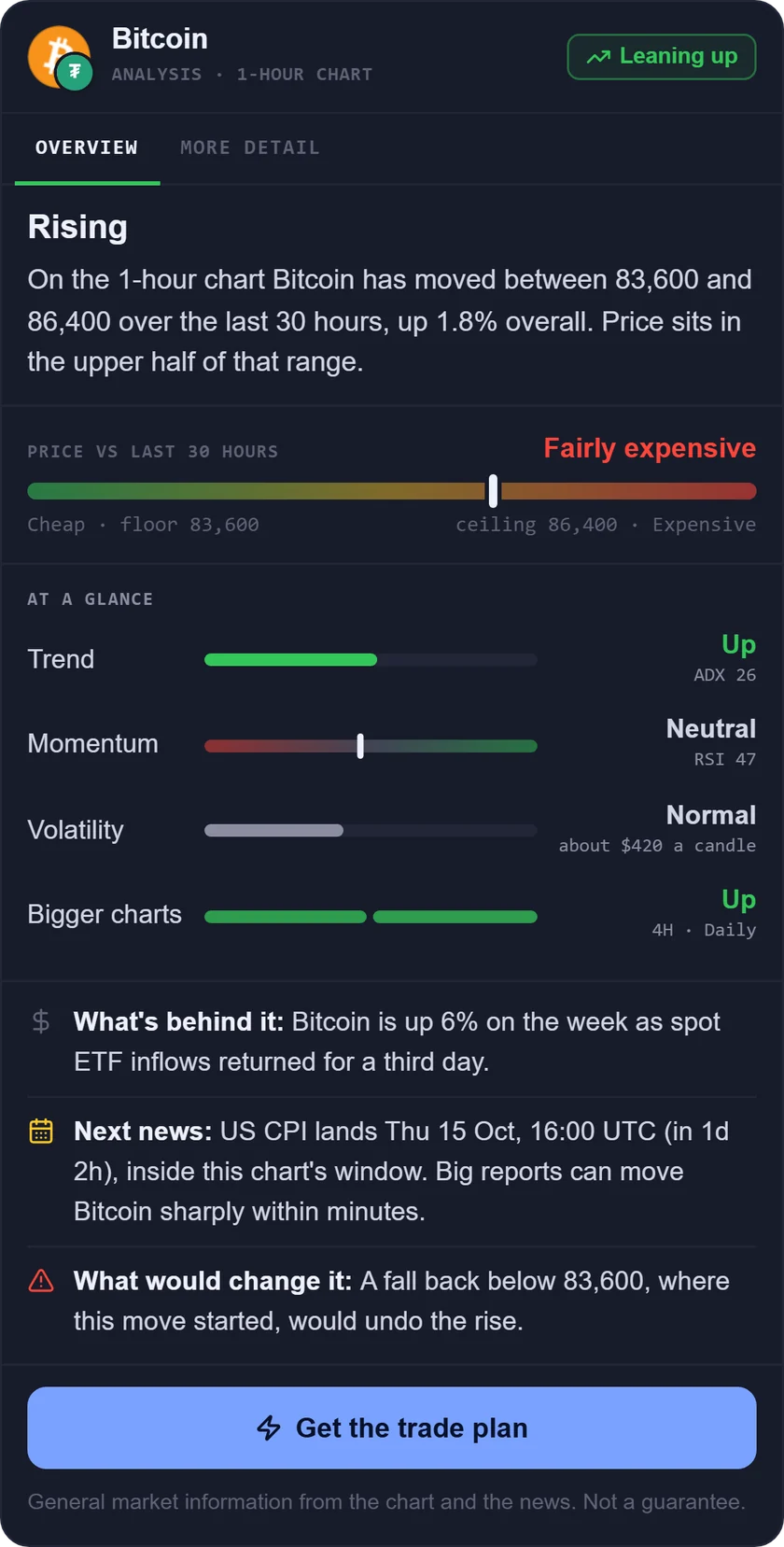
What it is: an AI trading assistant on iPhone, Android and the web. You ask about a market in your own words, and it reads live prices, indicators, today's news and the economic calendar before it answers.
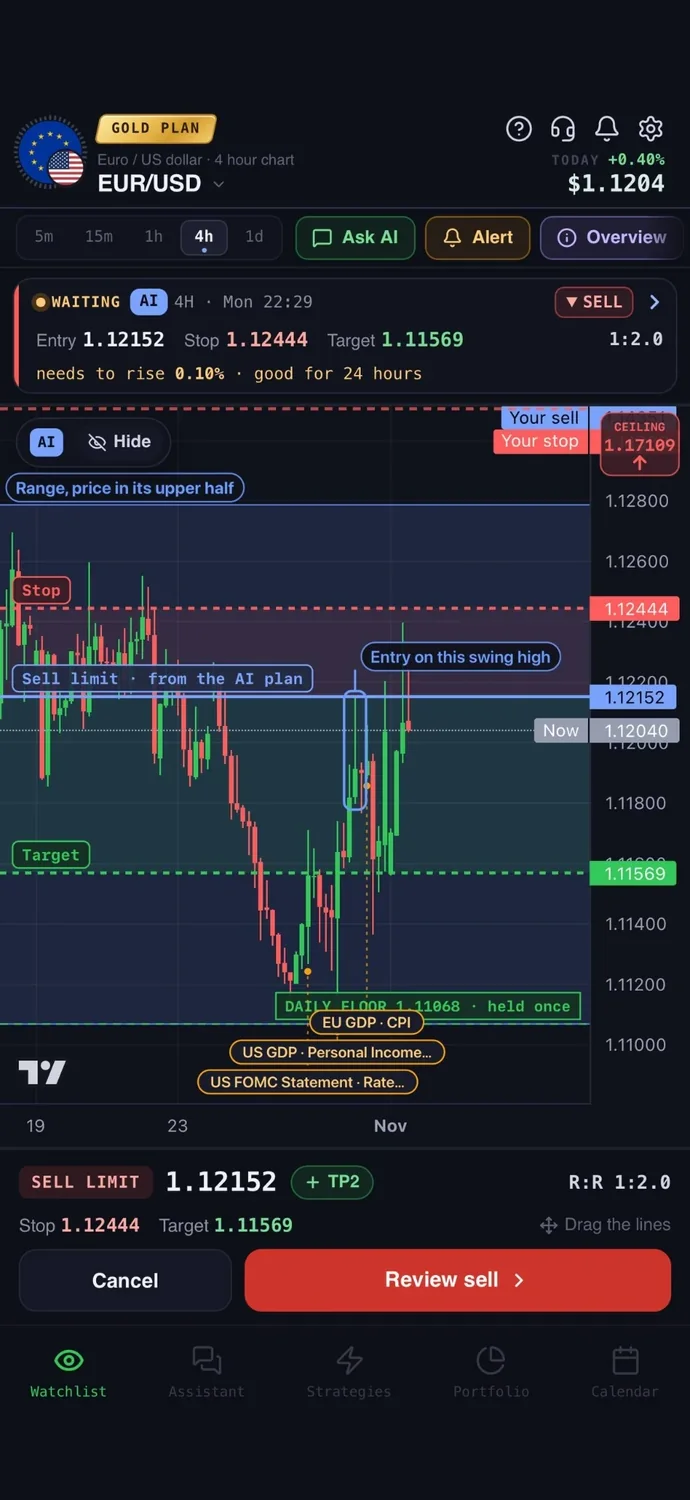
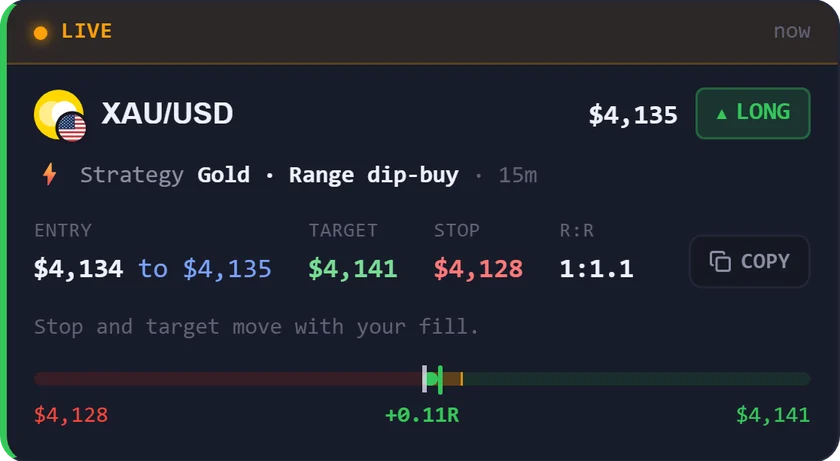
For forex: a trade plan on any main pair with an entry, a stop loss, a take profit, the risk to reward and what would cancel the idea, with the key levels drawn on the chart. The economic calendar shows what is coming and what each release usually means. A strategy builder lets you describe a rule in words, including inside or outside the London, New York, Tokyo or Sydney session, test it on real price history, and get a push and a Telegram message when it triggers. You can connect a broker account and place the order from the app: for cTrader on the Trader and Gold plans, and for MetaTrader 5 on the Gold plan. You confirm every order, and your money stays with your broker. A demo account lets you practise with $10,000 of fake money at live prices.
Price: your first questions and your first trade plan are on us; after that, the paid Trader and Gold plans are priced by country (see the pricing page).
Keep in mind: it is an analysis tool, not a robot, and it never places a trade without your confirmation. It is not a broker, so you still need a broker account to trade live.
2. MetaTrader 5: a platform that works across brokers
What it is: trading software for forex and stock markets from MetaQuotes, on Windows, macOS, iPhone, Android and the browser. MetaQuotes says it does not provide brokerage services.
For forex: you get charts, alerts and a demo account, and its site says the platform shows main macroeconomic indicators by country. It suits traders who want one platform across many brokers; live trading goes through a broker that runs an MT5 server.
Price: the iPhone app is free to download. The site shows no platform price.
Keep in mind: you cannot trade without a separate broker account. The store listing warns that trading may involve a high risk of losing money rapidly. More on the link in MetaTrader 5 and AiTradely.
3. cTrader: modern charts through your broker
What it is: a trading platform from Spotware for forex and CFDs, on web, Windows, Mac, iOS and Android. You connect a broker account or use a demo.
For forex: the iPhone listing mentions time-based, tick, Renko, range and Heikin-Ashi charts, drawing tools, dozens of indicators and price alerts. You can open a demo with virtual funds before going live.
Price: no platform price is shown, and the iPhone app is free. Third-party add-ons in its store vary in price.
Keep in mind: live trading needs a broker account, and the mobile apps list Trade only, without the Algo feature of the desktop and web versions. An economic calendar is not stated for the platform itself. See apps that connect to cTrader.
4. TradingView: charting across many markets
What it is: a charting and market-tracking platform and social network covering stocks, crypto, futures, forex and more.
For forex: it offers drawing tools, indicators, Bar Replay, an economic calendar with filters by country and importance, cloud alerts and Paper Trading with simulated money. Orders go through integrated brokers connected to the charts. Our comparison is in AiTradely vs TradingView.
Price: Basic is $0. Paid plans run $12.95, $29.95, $59.95 and $199.95 per month, billed annually.
Keep in mind: the Basic plan allows 2 indicators per chart and 3 active price alerts.
5. Investing.com: news, calendar and quotes
What it is: a financial data and news site and app with a calendar, charts and portfolio tools, covering currencies, stocks, commodities, crypto and more.
For forex: the live economic calendar filters by country, impact and date. The app lists interactive charts, 100+ technical indicators, drawing tools, and price alerts with push, plus event and news triggers.
Price: the app is free to download with core features. In-app subscriptions listed are Pro at $18.95 per month or $229.00 per year, and Pro+ at $46.95 per month or $559.99 per year.
Keep in mind: it is a data and research app only. It cannot place trades, and a practice mode is not stated.
6. FXStreet: forex news and calendar in one place
What it is: a forex news, analysis, charts and economic calendar site and app.
For forex: the app lists live charts for 1,600+ instruments, an economic calendar with 1,000+ events from 42 countries with a volatility indicator, and custom notifications for prices, news and data releases. Its markets include forex and gold.
Price: the app is free. In-app purchase prices are not stated.
Keep in mind: it does not place trades. The listing says content is for informational and educational purposes only, and the app carries advertising and broker reviews.
7. Tradays: a simple economic calendar
What it is: an economic calendar from MetaQuotes with event descriptions and historical data, on iOS, Android and as a website widget.
For forex: it lists 900+ indicators with detailed descriptions, complete history, 9 languages and automatic updates. See how to read an economic calendar to use one well.
Price: its site says use is at no cost.
Keep in mind: it is a calendar only, with no charts or trading. Alerts are not stated.
How to choose the best forex trading app
- You want an AI plan with entry, stop and target, plus a rule alert: AiTradely.
- You want one platform that many brokers support: MetaTrader 5.
- You want modern charts and a demo before going live: cTrader.
- You want deep charting across many markets and paper trading: TradingView.
- You want news, a calendar and quotes in one app: Investing.com.
- You want forex-focused news and a calendar: FXStreet.
- You only need a clean economic calendar: Tradays.
- You are choosing a broker: check that it is regulated where you live before you deposit, and test it on a demo first.
More comparisons: the best AI trading apps, the best AI apps for gold trading, TradingView alternatives, ChatGPT for trading vs AI apps, the best trading apps for beginners, the best crypto trading apps, the best gold trading apps, the best AI for stock trading, the best trading journal apps, AI trading bots vs assistants, the best AI apps for MetaTrader 5 and the best AI apps for cTrader.
Common questions
01What is the best forex trading app for beginners?
It depends on what you need first. MetaTrader 5, cTrader, TradingView and AiTradely all offer a way to practise, through a demo or paper trading, so you can learn without real money.
02Is there a forex trading app that places trades without a broker?
No app on this list does. MetaTrader 5 and cTrader trade through a broker, and AiTradely lets you place an order on your connected broker account after you confirm it.
03Which forex trading apps have an economic calendar?
TradingView, Investing.com, FXStreet and Tradays list one, MetaTrader 5's site mentions macroeconomic indicators, and AiTradely includes one. cTrader does not state one for the platform itself.
04Which app is best for forex signals on Telegram?
This list does not cover signal channels. AiTradely can send a Telegram message when a rule you built triggers, so the rule is yours rather than someone else's call.
How to plan a forex trade in AiTradely
- Check the economic calendar for releases that could move your pair. The guide on reading an economic calendar helps.
- Ask the assistant about the pair and pick your timeframe, then read the trade plan with its entry, stop loss, take profit and risk to reward.
- Size the position with the position size calculator so a stop hit costs an amount you chose.
- If you have a rule in mind, describe it in the strategy builder, test it on history and ask for an alert when it fires.
- If you have connected a cTrader or MetaTrader 5 account, confirm the order yourself. New to all this? Start with how to start forex trading.
Once you have picked a charting app and a broker, the next step is a repeatable routine. In AiTradely, the trade plan and the strategy builder fit that routine: read the plan for a pair you follow, then set an alert at its entry price.
Nothing here is financial advice. Forex is traded with leverage, so a small move against you can cost more than you expected, and no app removes that risk.
 AiTradelyYour AI trading analyst, in your pocketAI analysis for gold, forex and stocks. Build and backtest strategies, get signals, and trade from your own broker account.
 On your phoneScan for the app